The WordPress MySQL connection information is located in wp-config.php, in your site's folder. See DB_NAME, DB_USER, DB_HOST and the table prefix, then locate the corresponding database in cPanel. Do not share DB_PASSWORD.
Step 1: locate the correct site folder
In cPanel, check the document root associated with the domain. This is often public_html, but an addon domain, a subdomain or an installation in a subfolder may use a different location. A single account can host multiple WordPress installations.
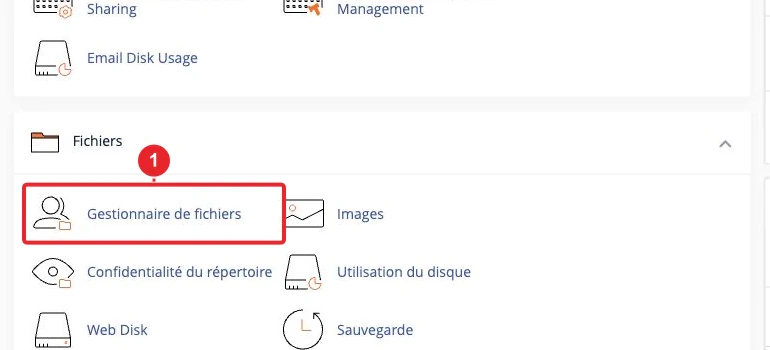
- Open the File Manager.
- Go to the folder of the site in question.
- Look for the folders
wp-admin,wp-contentandwp-includesto confirm the installation.
Step 2: view wp-config.php
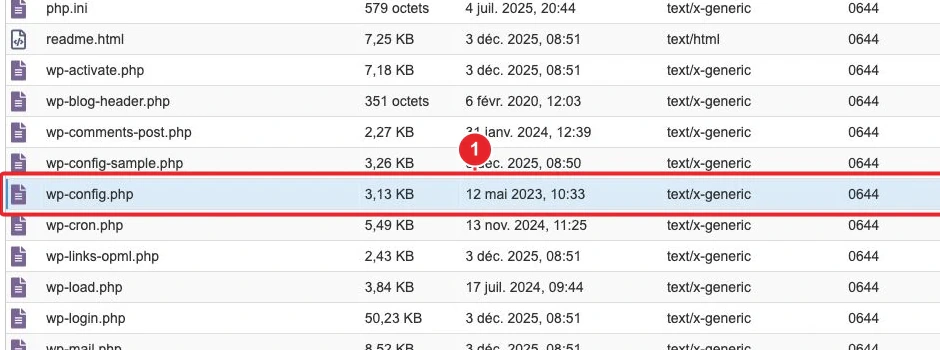
Locate wp-config.php and use View when that command is available. Otherwise, open the editor and inspect the file without saving changes. On some installations, this file is placed one level above the WordPress folder.
Understanding the information to note
The following example is fictitious: it is intended to identify the useful lines, not to replace your configuration.
define('DB_NAME', 'compte_wordpress');
define('DB_USER', 'compte_wpuser');
define('DB_PASSWORD', 'MOT_DE_PASSE_NON_AFFICHÉ');
define('DB_HOST', 'localhost');
$table_prefix = 'wp_';- DB_NAME : the name of the database used by this installation.
- DB_USER : the MySQL user authorized to connect to it.
- DB_PASSWORD : its password. It must remain confidential.
- DB_HOST : the address of the database server, sometimes including a port or a socket.
- table_prefix : the WordPress table prefix. This is not the cPanel account prefix.
If these values are loaded from another file or from environment variables, follow the configuration actually used by your installation rather than adding new lines.
Step 3: cross-check the information in cPanel
Open MySQL Databases management to find the full name and the associated user. In phpMyAdmin, the corresponding database should contain the tables of your installation, using the prefix you noted. Multiple sites can share a database using different prefixes.
cPanel does not reveal a MySQL user's password. Do not reset it just to view it: that also requires updating every application that uses it.
What information should you share with support?
To open a ticket with CAP CONNECT, the domain, the database name and the error message are often sufficient for an initial diagnosis. Do not provide a complete wp-config.php file or an unmasked screenshot showing its passwords or security keys.
See also
Reference documentation
Documentation consulted on October 13, 2026. Labels and tools may vary depending on your version of cPanel and your hosting options.