You can update domain contact information through the available management options. Depending on the domain extension, registrant, administrative and technical contacts may be handled separately or together. Important : The following guide describes the usual process for supported top-level domains. A change of holder for a .ma domain name is handled through the .ma domain holder transfer procedure.
What is WHOIS?
WHOIS is a query protocol traditionally used to look up registration details such as dates, statuses and nameservers. Public contact information may be restricted or redacted. RDAP provides structured registration-data access for supported registries.
How to change your domain contact information
Sign in to your Client Area « https://client.capconnect.com/clientarea.php »

Under the menu Domains click My Domains or open the tab Domains on the homepage.
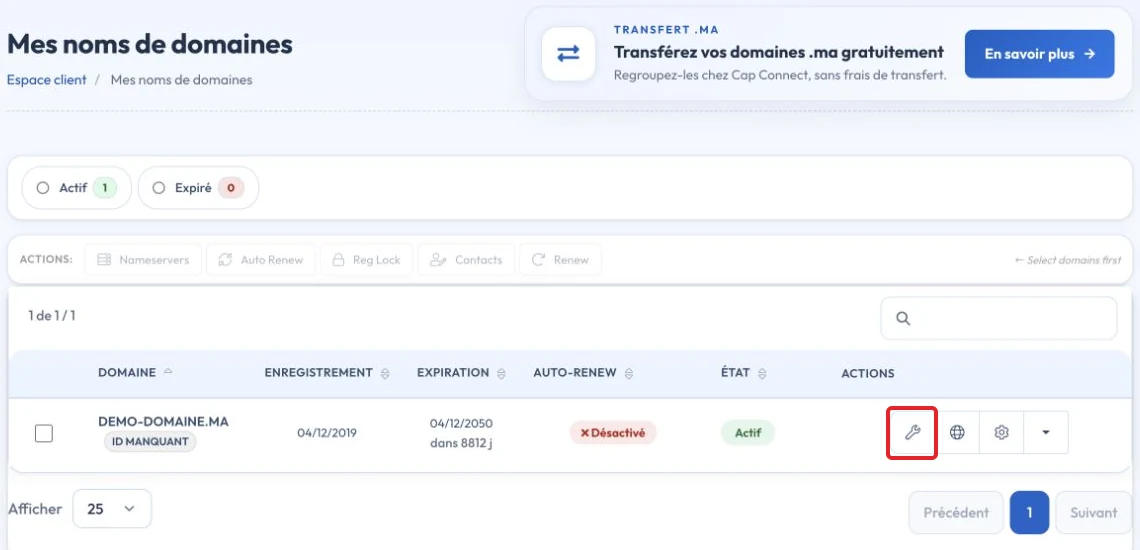
Click Manage Domain on the relevant domain’s row

In the management area, click Contact Information »

Make your changes and click Save Changes.

The time before updated details appear depends on the registrar and registry. Changes to the registrant’s name, organization or email may require confirmation under applicableICANN policies or the registrar’s procedures. Follow the verification email sent to the relevant contact addresses. Complete the required confirmation before assuming that the change has been applied.
Key points
For generic extensions, RDAP has replaced WHOIS as the reference protocol. Personal information may be redacted. A lookup alone does not prove domain ownership or replace access to the registrant's account.
Reference documentation:
- Registration Data Access Protocol (RDAP)
- EPP Status Codes | What Do They Mean, and Why Should I Know? - ICANN
Sources accessed on October 11, 2026. Available features depend on your hosting version and options.