To transfer a domain from your current provider to CAP CONNECT, first check its eligibility and the requirements for its extension, then follow these steps:
Understand how it works
- Unlock the domain with your current provider and obtain the transfer authorization code when required for its extension.
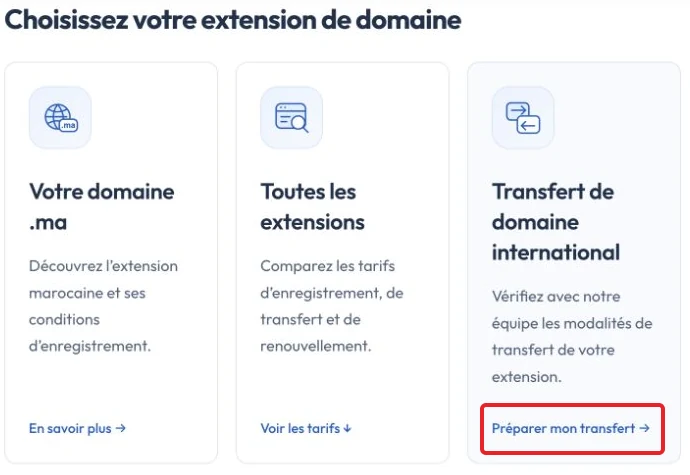
- On the domain names page, the International domain transfer card offers Prepare my transfer to check the arrangements with our team. The French screenshot labels this button Préparer mon transfert.
To enter a request directly, open the client-area domain transfer form.
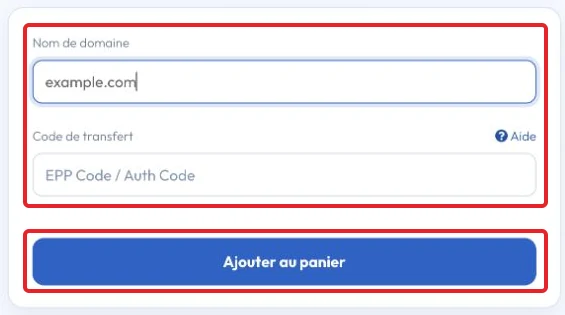
Enter the Domain name and its Transfer code (EPP / Auth Code), then select Add to cart to continue the order. The screenshot shows an unsubmitted example using the French interface; use your own domain and code.
- Select any applicable options, then clickContinue».
- Check the order and clickCheckout. Complete payment through an available method.
- The transfer may require confirmations sent to the registered contact or completed through the provider’s panel. Follow the instructions for your domain.
- Complete any required confirmation promptly. Notes:
Confirmation deadlines and transfer stages depend on the extension and registrar procedure. If the request fails or expires, check its status through your client area, then contact support before retrying or paying again.
After the required confirmation, processing continues according to the applicable transfer procedure.
The current provider may receive a transfer request.
For applicable gTLD transfers, the losing registrar has a defined response period. Lack of response can lead to automatic approval under the policy, subject to eligible status and requirements.
If the current provider rejects the request, ask for the reason and resolve the blocking condition before retrying.
Transfer of a .ma domain name depends on its extension and status; ask support for the expected procedure and timing.
A registrar transfer alone usually preserves existing DNS, but it does not guarantee uninterrupted service if hosting, DNS or mail settings are changed or discontinued.
Plan any DNS change separately. Preserve required records and test the services; DNS timing depends on TTL and caches rather than a fixed 24-hour interval.
Reference documentation:
- FAQs for Registrants: Transferring Your Domain Name - ICANN
- EPP Status Codes | What Do They Mean, and Why Should I Know? - ICANN
Sources accessed on October 11, 2026. Available features depend on your hosting version and options.