Changing a MySQL or MariaDB user’s password can interrupt applications still using the old password.
Prepare affected applications
Identify the user, associated databases and sites that use it. Back up configuration files and prepare to update them.
Change the password in cPanel
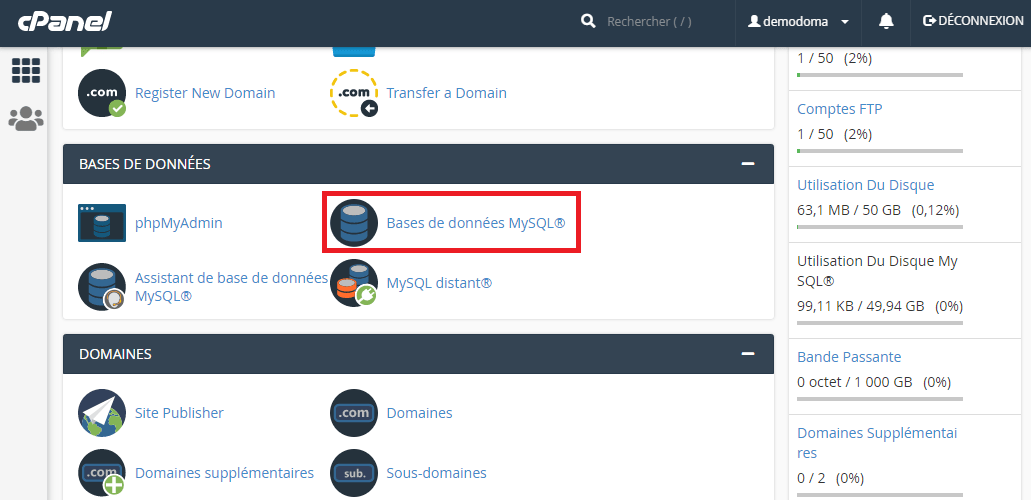
- Open Manage My Databases.
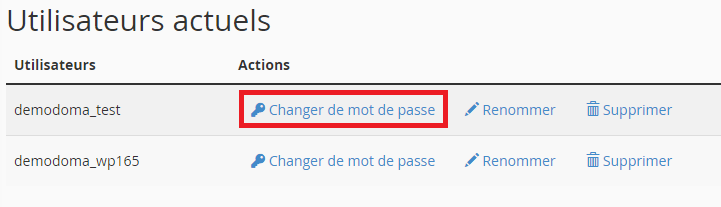
- Find the relevant user in the user list.
- Choose the password-change action.
- Enter and confirm a unique password, then save.
Update configuration
Immediately replace the old value in affected applications. In WordPress, this is generally DB_PASSWORD in wp-config.php. Do not change the database or username without a reason.
Test the connection
Open the sites and their administration areas. Persistent errors may involve the full username, host or privileges. If one user serves several sites, test them all.
Interface illustrations
These screenshots show the versions used when the original article was written. Labels may differ in your current version; follow the written procedure and your account settings.

Related guides
Reference documentation:
Sources accessed on October 11, 2026. Available features depend on your hosting version and options.