Renew your domain before expiration to maintain your online services. This guide explains the process.
Introduction to renewal
A domain name has a defined registration period. Available terms depend on the extension and registry limits. Renew before expiration to retain control and avoid interruption, restoration fees or eventual release for registration by someone else.
When can you renew a domain?
Renewal extends the registration period. Complete it before the deadline to continue using the domain and connected services such as hosting or business email. CAP CONNECT provides domain renewal through the Client Area. Check the actual due date and confirmation rather than assuming reminders guarantee renewal. Note: Country-code domains are ccTLDs, not gTLDs. Some extensions or providers impose advance renewal deadlines. Check the requirements for your specific extension instead of applying one universal one-month rule.
Renew before the due date
Keep contact details current and read renewal notices promptly. When a reminder arrives, sign in through the official Client Area and review the invoice and domain details. Select an available payment method and complete payment. Processing depends on confirmation and the domain’s requirements. If you cannot find the reminder, check invoices directly in the Client Area. After receiving renewal confirmation, verify that the registration expiration date has been extended by the purchased term.
Renewal notification
Early renewal
Where supported, you can renew during the current registration period. Early renewal generally adds the purchased term to the existing expiration date, subject to registry rules and maximum terms; it does not shorten the remaining registration. To renew, follow these steps: Sign in to your client account
Renewal steps

Click Domains on the homepage
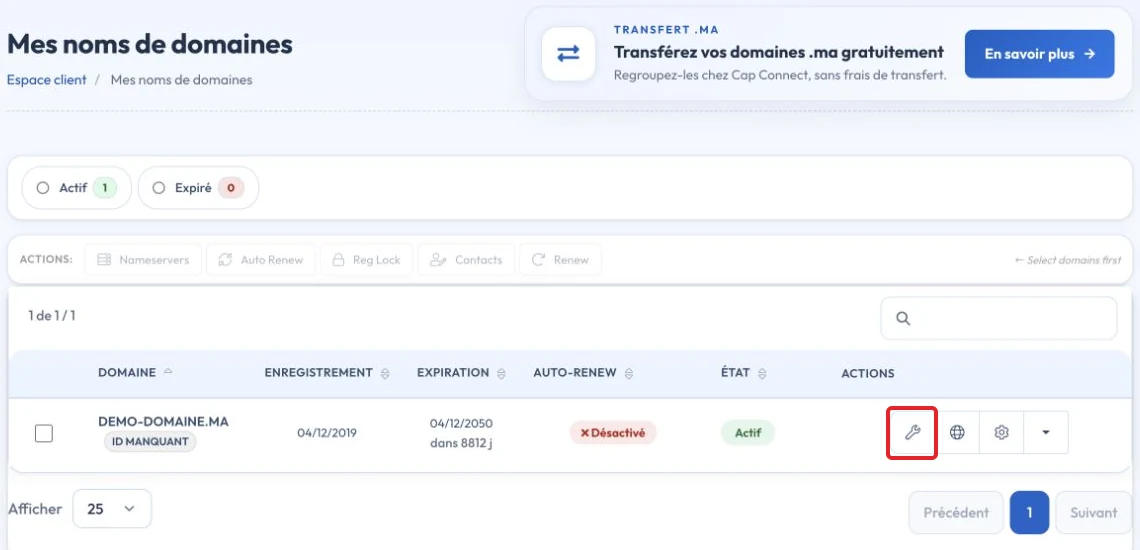
Open the relevant domain’s action menu and choose Renew

Select an available renewal term. Limits depend on the extension and the maximum total registration period; use the choices offered for your domain.

Complete the renewal order and pay the invoice. Check the confirmation and new expiration date.
Options after expiration
Can you renew an expired domain?
If the deadline was missed, check the renewal options in the Client Area immediately. Domain-dependent services may stop working after expiration. For gTLD extensions If the displayed status is EXPIRED, ordinary renewal may still be available during the provider’s post-expiration period. Its length varies. If the status is REDEMPTION PERIOD, restoration may be required with additional fees. Contact support for the actual cost and remaining time. After redemption ends, a domain may enter a final deletion stage in which restoration is unavailable, then be released. Check the registry’s actual status rather than calculating a universal timeline. For .ma If your .ma domain has expired, check its current registry status and contact support promptly. The status label PENDING DELETE must be interpreted using .ma registry rules, rather than assumed equivalent to the final deletion stage of a gTLD. Ask which renewal or recovery action is available and its deadline and cost. Do not rely on the site remaining active or on guaranteed recovery. Once released, the name may be registered by another eligible applicant.
Renew early and verify completion to reduce the risk of service interruption.
Reference documentation:
- 5 Things every Domain Name Registrant should know about ICANN's Expired Registration Recovery Policy (ERRP) - ICANN
- EPP Status Codes | What Do They Mean, and Why Should I Know? - ICANN
Sources accessed on October 11, 2026. Available features depend on your hosting version and options.