An EPP code, also called an authorization or AuthInfo code, authorizes transfer of certain domain extensions to another provider. Keep it confidential.
Check that the domain can be transferred
Check the extension, domain statuses and contact address. For some generic extensions, a transfer lock can apply after registration, transfer or a registrant change. The .ma rules are separate.
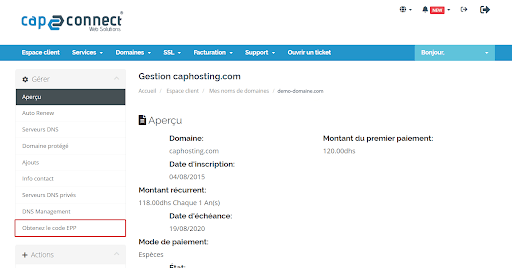
Request the code in the Client Area
- Sign in to your Client Area and open the relevant domain.
- Locate the protection or lock option. Disable the transfer lock only when you are actually preparing a transfer.
- Choose Get EPP Code, if available.
- Follow the displayed instructions and check messages sent to the authorized contact address.
Use and protect the code
Send the code only to the provider you want to transfer to. It does not automatically transfer the website, files or emails.
If the option or code is missing
Open a ticket identifying the domain and requested operation. Do not publish the code in a screenshot or a message accessible to others. If you abandon the transfer, re-enable domain protection.
Interface illustrations
These screenshots show the versions used when the original article was written. Labels may differ in your current version; follow the written procedure and your account settings.
Reference documentation:
- FAQs for Registrants: Transferring Your Domain Name - ICANN
- EPP Status Codes | What Do They Mean, and Why Should I Know? - ICANN
Sources accessed on October 11, 2026. Available features depend on your hosting version and options.